

TOEIC Reading Master Review: Practice TOEIC Reading Parts 5–7 with Explanations and a 100-Question Mock Test
The TOEIC Reading section asks you to answer 100 questions in 75 minutes. For many test takers the real problem is not knowledge but time: long Part 7 passages eat the clock, and the same grammar traps keep costing points. The most reliable fix is regular TOEIC reading practice with exam-style questions, followed by a clear explanation of why each answer is right.
In this review, ChatStick introduces TOEIC Reading Master, our new App Store app built as a personal coach for the reading section. It covers Part 5, Part 6 and Part 7, explains every question in Thai, and runs on both iPhone and iPad. It is aimed at students, working professionals and anyone who needs a TOEIC score for a job application or further study.
Why TOEIC Reading needs a structured approach
TOEIC Reading combines grammar, vocabulary and comprehension under time pressure. If you simply work through random questions, it is hard to see where you are actually weak. You might keep missing tense questions in Part 5, or spend so long on a double passage in Part 7 that the last questions go unanswered.
Effective practice works as a loop: learn, practice, take a timed test, analyze the results and review weak points, then repeat until your skills improve. That loop is the core idea behind how TOEIC Reading Master is designed.
Meet TOEIC Reading Master by ChatStick
TOEIC Reading Master launched on the App Store in October 2026. It covers all three reading parts, and every answer comes with a reason: the grammar point being tested, a TOEIC tip and the common trap to avoid. Beyond the question bank, it includes timed mock tests, weak-point analysis, a mistake notebook, a reading strategy course and a contextual vocabulary bank.
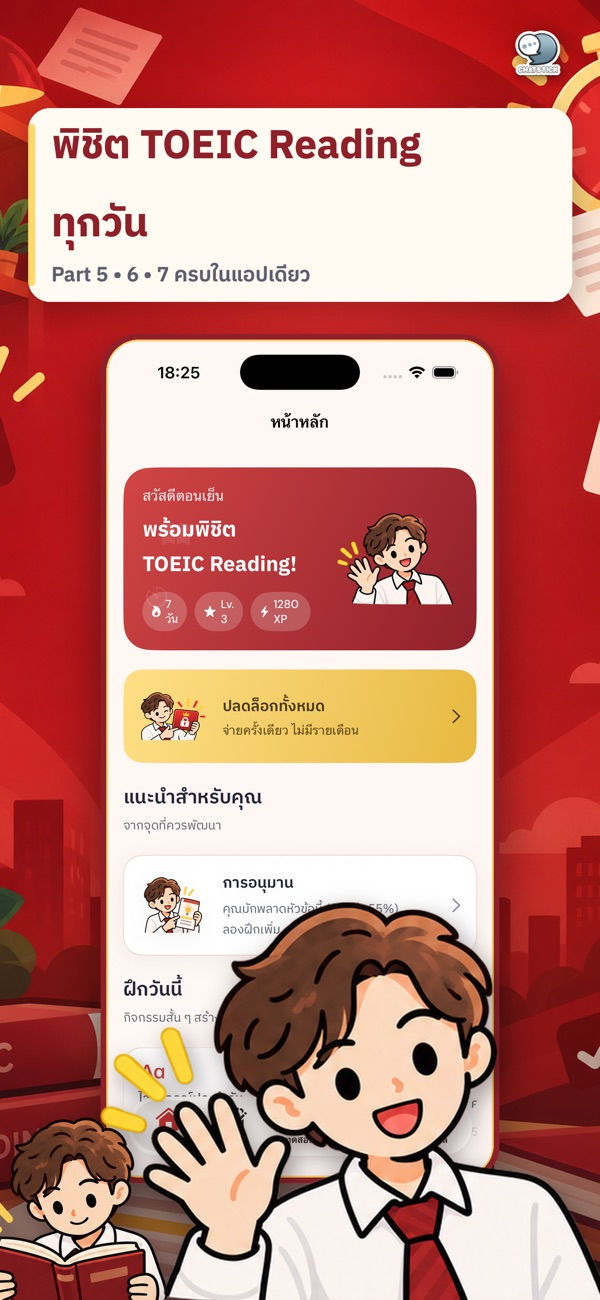
Full coverage of TOEIC Reading Parts 5, 6 and 7
Part 5 Incomplete Sentences: more than 800 grammar and vocabulary questions organized by topic, including tenses, prepositions, subject-verb agreement, conditionals and context-based vocabulary
Part 6 Text Completion: practice with emails, memos, notices, advertisements and letters
Part 7 Reading Comprehension: single, double and triple passages across all document types
Because Part 5 is grouped by topic, you can drill the exact grammar areas you keep getting wrong. Parts 6 and 7 build familiarity with the workplace documents that make up most of the exam.
Key features that help you read faster and answer accurately
Explanations for every question: why the answer is correct, the grammar point, TOEIC tips and common traps
Three test lengths: a 20-question quick test, a 50-question short test and a full 100-question mock exam in 75 minutes, with a timer and question flagging
Results by part: a score summary broken down by Part after each test
Weak-point analysis: tracks accuracy by topic, highlights what needs work and recommends practice sets
Mistake notebook: wrong answers are saved automatically so you can review them until you master them
Reading Strategy Academy: lessons on skimming, scanning, keyword matching, paraphrasing, inference and time management
Contextual vocabulary: TOEIC words with translations, pronunciation and example sentences, plus a list of saved words
How to get the most out of a TOEIC reading app
Start with a 20-question quick test to see which part needs the most attention.
Open the weak-point analysis and drill the Part 5 topics with the lowest accuracy.
Learn skimming and scanning in the Reading Strategy Academy before tackling Part 7.
Review your mistake notebook regularly and reread the explanations so the same traps stop catching you.
When you feel ready, take the 100-question, 75-minute mock exam to practice pacing under real conditions.
Tip: preparing for the full TOEIC? Pair this app with TOEIC Listening Master from ChatStick to cover Listening Parts 1–4 as well.
What is free and what premium adds
The app is free to download and offers free practice every day. You can also earn a Study Pass by watching ads, which temporarily unlocks premium content. For full access there is an optional in-app purchase, Unlock All Features, priced at ฿99 as a one-time payment, with no subscription and no ads.
App details at a glance
App name: TOEIC Reading Master
Price: free, with an optional in-app purchase Unlock All Features ฿99 (one-time)
Compatibility: iPhone and iPad (iOS / iPadOS 18.0 or later), Mac with Apple M1 chip or later (macOS 15.0 or later), Apple Vision (visionOS 2.0 or later)
Size: about 18.2 MB
Category: Education, rated 4+
Developer: ChatStick Company Limited
Note: this is an independent study tool and is not affiliated with or endorsed by ETS, owner of the TOEIC trademark
Frequently asked questions (FAQ)
Who is TOEIC Reading Master for?
Students, working professionals and anyone who needs a TOEIC score for a job or further study, especially learners who want to improve the reading section. Explanations are written in Thai.
Which TOEIC parts does it cover?
All three reading parts: Part 5 Incomplete Sentences, Part 6 Text Completion and Part 7 Reading Comprehension.
How close is the mock test to the real exam format?
The full mock exam has 100 questions with a 75-minute timer, matching the length of the TOEIC Reading section, and shows results by Part. Shorter 20- and 50-question tests are also available.
Do I have to pay?
No. It is free to download with daily free practice. You can temporarily unlock premium content with an ad-based Study Pass, or buy Unlock All Features for ฿99 as a one-time purchase.
Conclusion
If you want TOEIC reading practice that covers Parts 5, 6 and 7, explains the reasoning behind every answer, includes timed mock tests and points out your weak spots, TOEIC Reading Master from ChatStick is worth a try. Download it free and take your first quick test today.
See all ChatStick apps on ChatStick on the App Store



Comments