

7 A-Level Chemistry Study Tips for Thai TCAS Students, With a 1,000-Question Practice App
Chemistry is the subject where many students feel confident after reading the textbook, then freeze in front of a real question. The exam rarely rewards memorization alone; it asks you to combine formulas, calculations, graph reading and the interpretation of lab results. If you are working on A-Level Chemistry study tips for Thailand's TCAS admission exams, here are seven techniques that make your study time more structured and more effective.
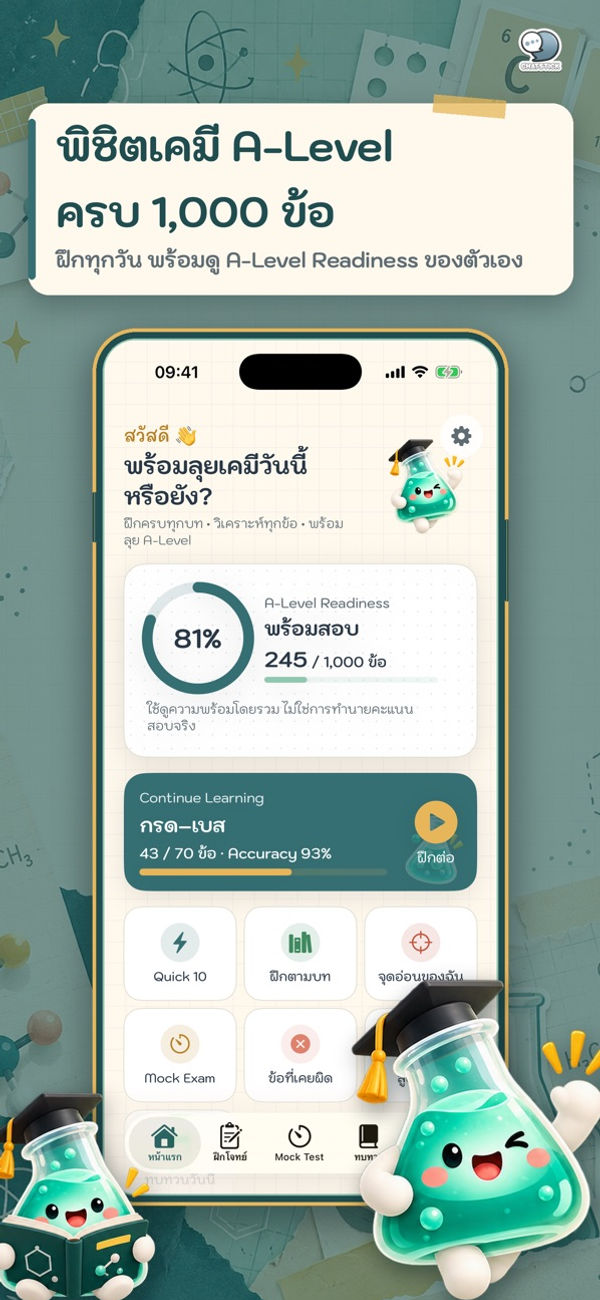
For each tip, we show how to practice it with “ตะลุยโจทย์ เคมี A-Level 1000” (A-Level Chemistry 1000), a new app from ChatStick released on the App Store on October 12, 2026. It contains about 1,000 chemistry questions across 13 chapters, with detailed worked solutions and timed mock exams, on both iPhone and iPad.
Tip 1: Plan by chapter, not by page
Before you start, split the syllabus into big blocks and schedule which week covers which chapter. You see the whole picture and you stop skipping the chapters you dislike. The app organizes its 13 chapters into three groups:
Properties of elements and compounds: atoms and the periodic table, chemical bonding, gases, organic chemistry and polymers
Chemical equations and reactions: stoichiometry, reaction rates, chemical equilibrium, acids and bases, and electrochemistry
Practical skills and quantitative chemistry: laboratory safety, the mole, and solutions and concentration
Tip 2: Climb the difficulty ladder step by step
Jumping straight into the hardest questions is a quick way to lose motivation. Start with basic questions that confirm you understand the concept, then move up. The app sorts questions into four levels, Basic, Standard, Advanced and Challenge, so you can match the level to how ready you are in each chapter.
Tip 3: Practice numeric-entry calculation questions
With numeric-entry questions there are no options to guess from: the formula, the units and the arithmetic all have to be right. Regular practice cuts the small slips that cost marks. The app includes both five-option multiple choice and numeric-entry questions, covering calculations, graphs, data tables, lab scenarios and molecular structures.
Tip 4: Read solutions for the reasoning, not just the answer
After each question, ask which concept it tested and why the other options fail. Each solution in the app walks through:
The underlying concept
The formula used
Step-by-step working
The final answer
Why each incorrect option is wrong
An Exam Tip that flags common traps
Tip 5: Log why you got it wrong, then target weak points
Chemistry mistakes tend to repeat: the wrong formula, a calculation slip, or mixed-up units. Knowing your most common mistake type helps more than grinding through new questions. The app has tools built for exactly this:
Mistake notebook: saves every missed question and tags the reason, such as wrong formula, calculation error or unit confusion
Weak Point Analysis: practice 10 weak-point questions with one tap
Smart Review: automatically builds a “review today” list
Tip 6: Review formulas and the periodic table a little every day
Short, regular review sticks better than cramming the night before. The app offers condensed formula cards with a “remember this” note, an interactive periodic table showing atomic number, atomic mass, group, period and EN/IE₁ trends, plus diagrams such as titration curves, energy diagrams, Lewis structures, organic structural formulas and galvanic cells. There are also 10 daily questions with a Study Stamp, 7-day, 30-day and all-time statistics, a study streak, and a daily reminder at the time you choose.
Tip 7: Rehearse with timed mock exams
As exam day approaches, sit full papers under time pressure to train your pacing and composure. The mock exams in the app work like this:
10 sets of 35 questions, 90 minutes, 100 points
The timer keeps running even if you leave the app, just like a real exam room
Skip, flag and review questions before submitting, with no ads during the exam
Results by group and chapter, and a practice set built from the questions you missed
Tip: Take your first mock to find your baseline, then use the per-chapter results to decide what to practice next. The app's A-Level Readiness score is a planning aid only, not a guarantee of your real exam result.
App at a glance
Price: free download, with 250 practice questions and 2 mock exams free
Unlock All Features: ฿99 one-time purchase, permanent and ad-free, not a subscription
Optional ad unlock: watch an ad for 15 minutes of Premium, up to 3 times a day
Compatibility: iPhone (iOS 18 or later), iPad (iPadOS 18 or later), Mac with Apple M1 or later (macOS 15) and Apple Vision (visionOS 2)
Size: about 29 MB, rated 4+
Works offline, no account required
Developer: ChatStick Company Limited
Frequently asked questions
Which chapter should I start with for A-Level Chemistry?
Start with foundation chapters that other topics build on, such as atoms and the periodic table and the mole, then let your mock exam results or the app's Weak Point Analysis tell you what to practice next.
Does the app work without internet?
Yes. It works offline and does not require an account.
Is it free?
The download is free and includes 250 questions and 2 mock exams. Everything else unlocks with a one-time ฿99 purchase.
Is this an official TCAS or CUPT app?
No. The app is not owned by or endorsed by the Council of University Presidents of Thailand or any exam organizer. All questions are newly written for practice and are not copied from real exams.
Conclusion
Effective A-Level Chemistry preparation comes down to planning by chapter, climbing the difficulty levels, learning from worked solutions, fixing weak points deliberately, reviewing daily and rehearsing under exam timing. If you want one tool that supports every step, start with the 250 free questions in A-Level Chemistry 1000. Preparing for the science track? ChatStick also offers A-Level Biology 1000 to practice alongside it.
See all ChatStick apps on the ChatStick developer page on the App Store


Comments